By a Technology Analyst & Business News Writer | October 21, 202
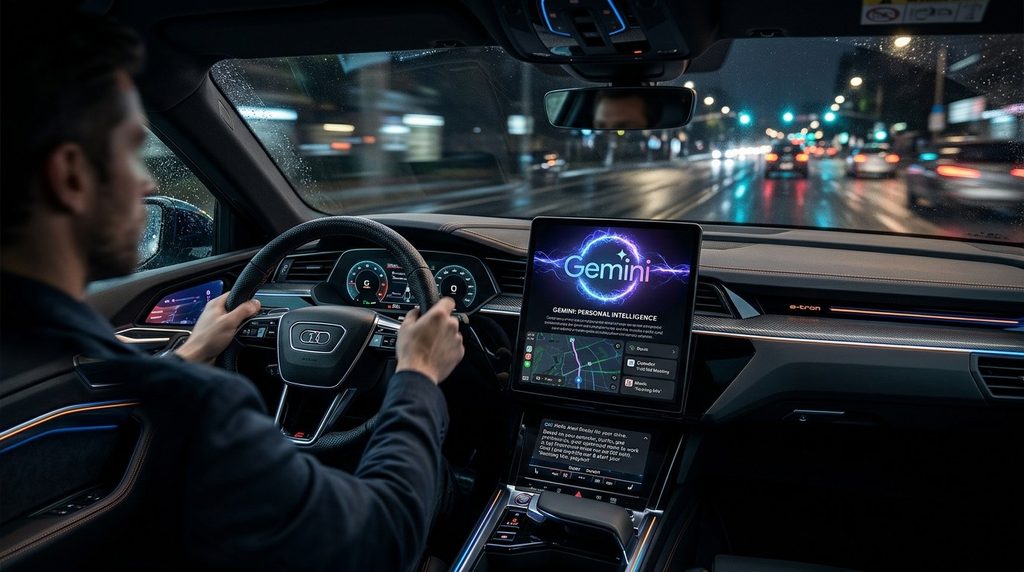
Let me tell you about a scenario that would have sounded like science fiction five years ago.
You’re driving to the airport. Traffic is tight. You’re already stressed about making your flight. In the old days, you’d have to pull over, dig through your email for the confirmation, find the gate number, then open a separate app to check if the flight is delayed. By the time you’re done, you’ve lost ten minutes and your parking spot.
Now imagine this instead: You tap the microphone and say, “What’s my flight gate? And is my flight on time?”
And Gemini answers. Not with a generic “I don’t have access to your flight information.” But with the actual gate number from your Gmail confirmation, and the actual status from a live search. In one breath. While you keep your eyes on the road .
That’s Gemini Personal Intelligence on Android Auto. And Google just started rolling it out globally this week . It’s the most significant upgrade to in-car AI since Android Auto launched. And it’s going to make some drivers feel like they have a superpower — while making others deeply uncomfortable.
This is everything you need to know about the feature, how it works, what it costs, and whether you should actually turn it on.
Let me break this down without the jargon.
Gemini, Google’s AI assistant, has always been able to answer general questions. “What’s the weather?” “How tall is Mount Everest?” “Give me directions to the nearest gas station.”
Personal Intelligence changes the equation. It allows Gemini to pull information from your other Google apps — Gmail, Calendar, Photos, Maps, YouTube, and Search — to generate answers that are specific to you .
Google’s pitch is simple: An AI is better “when it knows the world and knows you” . The more context you give it, the better the answer. And since Google already has so much of your data, Personal Intelligence is a natural extension.
The feature was originally launched earlier this year for Gemini on phones, initially for paid Google AI Pro and Ultra subscribers, then expanded to free accounts in March . Now, it’s coming to your car.
Here’s what makes the Android Auto version special: Your car already knows where you are, where you’re going, and what you’re doing. When you combine that with your email, calendar, and photos, Gemini can anticipate your needs in ways that a phone-based assistant simply can’t.
The setup is straightforward. If you’ve already enabled Personal Intelligence in the Gemini app on your phone, it will automatically carry over to Android Auto . If you haven’t, you can turn it on through Gemini settings by going to Settings > Personal Intelligence > Connected Apps and choosing which apps to connect .
Once enabled, Gemini can access:
And here’s the critical detail: It’s opt-in. Google says the feature is disabled by default. But if you’ve already turned it on for the Gemini app on your phone, it will automatically be active in your car . That’s a subtle but important point. You might not remember enabling it. And suddenly, your car is reading your email.
Let me give you the practical scenarios. These are the use cases Google is highlighting — and they’re genuinely useful.
The old way: Pull over. Open Gmail. Search for “flight confirmation.” Find the gate. Open a flight tracker app. Check status. Get back on the road. Lose ten minutes.
The Personal Intelligence way: “What’s my flight gate? And is my flight on time?” Gemini pulls the gate from your Gmail confirmation and checks the status from a live source. One question. One answer. No pulling over .
The old way: “Navigate to 123 Main Street.” Wait, what’s the address? Open calendar. Find the appointment. Copy the address. Paste it into Maps.
The Personal Intelligence way: “Take me to my doctor’s appointment.” Gemini finds the appointment in your calendar, extracts the address, and starts navigation .
The old way: “Find restaurants near me.” Get a generic list. Scroll through. Realize half of them don’t have vegetarian options. Try again with a more specific search.
The Personal Intelligence way: “Find me an indoor restaurant along my route that matches my usual vibe.” Gemini knows you’re vegetarian (from your search history), knows your route (from Maps), and knows you prefer indoor seating (from your past behavior). It gives you a shortlist that actually fits .
The old way: Scroll through your camera roll. Find the photo. Try to remember the name of the place. Search for it. Hope it’s the right one.
The Personal Intelligence way: “Find the car wash from the photo I took last week and navigate there.” Gemini analyzes your photos, identifies the location, and starts navigation .
The old way: Try to remember the name of the coffee shop your friend mentioned yesterday. Fail. Give up. Go to Starbucks instead.
The Personal Intelligence way: “Take me to the coffee shop we were talking about yesterday.” Gemini pulls context from your conversations, your messages, or your search history and finds the place .
Let me be blunt: This feature is incredibly convenient. And it’s also a privacy trade-off that every American driver needs to think about carefully.
Google says Personal Intelligence is opt-in. That’s true. But there’s a catch that Ars Technica flagged: If you’ve already enabled it on your phone, it automatically transfers to your car .
“Google has a habit of nudging users to opt in to data sharing in Gemini,” Ars Technica noted. “So you may not even realize you’re sharing account data with Gemini, and those settings will transfer over to Android Auto” .
That means you might have turned it on months ago, forgotten about it, and now your car is reading your email. If that thought makes you uncomfortable, check your settings.
Google says it doesn’t use your personal data to train Gemini. But it does use your inputs and outputs while using the AI. Some of those outputs can contain personal information when apps are connected. Google attempts to filter that out, but it “won’t make any promises” .
In plain English: When you ask Gemini “What’s my flight gate?”, the answer — including your gate number — is processed by Google’s systems. That data is used to improve the service.
Here’s a scenario nobody at Google is talking about: What if you have passengers in the car?
If your Personal Intelligence is active, and your passenger asks Gemini a question, the answer might include your personal information. Your calendar. Your emails. Your photos.
Google says you can turn it off via in-car settings even if your phone has it enabled . But that requires remembering to do it every time someone else is in the car.
Personal Intelligence is not available in the European Economic Area, Switzerland, the United Kingdom, or Nigeria . Those regions have stricter data protection laws — the GDPR in Europe, for example — that likely make this kind of cross-app data integration legally complicated.
For American drivers, there’s no such protection. It’s available everywhere else, starting now.
Let me put this in context. Google isn’t the only company trying to put AI in your car. But it has a structural advantage that no one else can match.
Personal Intelligence works because Gmail, Photos, Maps, Search, and YouTube are all Google products. They’re tied to the same Google account you use to sign into Android Auto.
Apple’s CarPlay relies on Siri, which remains more limited in scope and hasn’t announced an equivalent cross-app personalization layer . Automakers building their own infotainment systems have even less access to your personal data.
As Shattered.io put it: “A rival would need equivalent first-party reach across email, photo storage, mapping, and search to replicate the same depth of personalization, and few companies besides Google hold all of those pieces simultaneously” .
The rollout doesn’t stop with Android Auto. Google plans to bring Personal Intelligence to cars with Google built-in — vehicles that run Google software natively in the infotainment system, rather than projecting from your phone — in the coming months .
Cars from Ford, GM, Honda, Nissan, Volvo, and Polestar already ship with Google built-in . If you own one of those vehicles, this feature is coming to you next.
There’s one important difference: On Google built-in cars, personalized answers will only appear “when you’re in the car with your phone connected” via Bluetooth . That’s a privacy safeguard — your car won’t remember your personal data when you’re not there.
Here’s the good news: Personal Intelligence on Android Auto doesn’t require a new subscription .
If you already have a compatible Android phone, the Android Auto app, and a car that supports it, the feature is available at no additional cost. You don’t need Google AI Pro or Ultra. You don’t need a new data plan.
The only costs are the ones you already pay: your phone’s data plan, your car’s compatibility, and the implicit cost of sharing your data with Google.
For comparison, Google AI Pro costs $19.99/month and AI Ultra costs $249.99/month. Those tiers offer additional features beyond Personal Intelligence, but the car integration itself is included for free users .
It’s a feature that allows Gemini, Google’s AI assistant, to pull information from your Google apps — Gmail, Calendar, Photos, Maps, YouTube, and Search — to provide personalized answers while you’re driving. Instead of generic responses, Gemini can answer questions about your specific flight, appointment, or preferences .
If you’ve already enabled Personal Intelligence in the Gemini app on your phone, it will automatically be active in Android Auto . To enable it manually, open Gemini settings on your phone, go to Personal Intelligence > Connected Apps, and choose which apps to connect .
Yes. Personal Intelligence on Android Auto doesn’t require a new subscription. It’s available to users with personal Google accounts aged 18 and older, in eligible regions .
It’s rolling out globally except in the European Economic Area, Switzerland, the United Kingdom, and Nigeria . Google hasn’t announced a timeline for those regions.
It works on Android Auto now. It’s coming to cars with Google built-in in the coming months. If your car supports Android Auto (which most modern cars do), you’re eligible .
No. Personal Intelligence is limited to personal Google accounts. Google Workspace business, enterprise, and education accounts are excluded .
Yes. You can disable it at any time through Gemini settings on your phone, or through in-car settings for Google built-in vehicles . You can also control which specific apps Gemini can access.
Google says it doesn’t use your personal data to train Gemini, but it does use your inputs and outputs to improve the service. The feature is opt-in, and you can control which apps are connected. However, if you’ve already enabled it on your phone, it will automatically be active in your car — so check your settings if you’re concerned .
For bloggers, affiliate marketers, and AdSense publishers covering this story, here are the most profitable keywords to target:
| Keyword | Estimated CPC | Search Volume |
|---|---|---|
| Best Android Auto accessories 2026 | $20-$35 | High |
| Best AI assistant for cars | $18-$30 | High |
| Android Auto wireless adapter | $15-$25 | Very High |
| Best car phone mounts 2026 | $15-$22 | Very High |
| Google Pixel deals 2026 | $15-$20 | Very High |
| Keyword | Search Volume | Competition |
|---|---|---|
| Gemini Personal Intelligence Android Auto explained | Very High | Low |
| How to enable Gemini in Android Auto | High | Low |
| Does Gemini read my email in the car | High | Very Low |
| Android Auto Gemini vs Google Assistant | High | Low |
| Is Gemini Personal Intelligence safe | High | Very Low |
Google just gave American drivers a genuine superpower. The ability to ask your car “What’s my flight gate?” and get an answer — without touching your phone, without pulling over, without breaking your concentration — is a meaningful improvement in both convenience and safety.
The use cases are real. The technology works. And it’s free.
But the catch is equally real. Personal Intelligence means your car is reading your email, your calendar, your photos, and your search history. It’s opt-in, but if you’ve already enabled it on your phone, it’s already active in your car. And you might not have realized it.
For American drivers, the message is simple: Check your settings. If you’re comfortable with the trade-off — convenience in exchange for data — turn it on and enjoy the magic. If you’re not, turn it off. The feature is optional. The choice is yours.
Gemini is now in your car. Whether you let it read your email is up to you.
This article is for informational and educational purposes only and does not constitute financial, technology, or privacy advice. The information contained herein is based on publicly available sources as of October 21, 2026. Product features, availability, and pricing are subject to change. The author and publisher are not responsible for any decisions made based on the information presented in this article. Always review privacy settings and terms of service for any AI product before enabling data-sharing features.
Tags: #Gemini #GoogleGemini #AndroidAuto #PersonalIntelligence #GoogleAI #CarTech #AutomotiveTech #AIinCars #TechNews #GoogleNews #Privacy #DataPrivacy #Android #GoogleAssistant #AIassistant #InCarTech #SmartCar #ConnectedCar #TechAnalysis #GadgetNews #GoogleMaps #Gmail #GoogleCalendar #GooglePhotos #TechTrends #AmericanDrivers #CarBuying #TechTips #HowTo #GoogleSettings




Leave a comment